Keywordsai risk security governanceBlogai for workai at workworkplace aiai for professionalshow to use ai at workai productivity
Related searchesdata classification before using chatgptprompt injection at workwho is accountable for ai outputai security policy for teamswhat not to paste into chatgpt at workai risk security governance
Governance is how you keep the speed
Most organisations meet their first serious AI risk after someone has already pasted the wrong file into the wrong tool. Nobody thought of themselves as leaking. They thought of themselves as being efficient.
That is why this chapter sits after the capability chapters rather than before them. Prompting, analysis, agents and retrieval only become an operating system if the organisation can answer three questions without a committee: what may I put into this tool, what may the tool be allowed to do, and who owns the result if it is wrong? Governance is not a brake on adoption. It is the condition under which adoption can be repeated.
A language model does not know your contracts, your regulator, or your reputation. It will complete the text in front of it, including a customer list or a hidden instruction inside a vendor document. The model is not malicious. It is indifferent. Named humans, classified data and permission boundaries have to do the work that the model cannot do.
This chapter is professional practice, not legal advice. Data protection, confidentiality and sector rules vary by jurisdiction and contract. When a case is grey, stop and ask counsel or your data-protection officer. Do not ask a chatbot to settle the grey area.
Consumer tools and enterprise tools
The same model family can be offered as a consumer product and as an enterprise product. The difference that matters at work is not the quality of the prose. It is the contract, the tenancy, the logging, the identity, and the default assumption about whether your prompts become someone else's training material.
A consumer tool is the product you would use as a private individual: personal email, personal card or a free tier, terms written for the public. Prompts and uploads may be retained to improve the service. There is rarely a data-processing addendum or a way for security to see who used the tool and on what. Consumer tools are appropriate for public information and personal learning. They are not a workplace filing system.
An enterprise tool sits inside an organisational tenancy. People sign in with company identity. Administrators can restrict models, disable training on customer content, set retention, connect only approved sources, and produce an audit trail. That does not make it harmless. It makes the risk visible and bounded.
| Question | Consumer tool | Approved enterprise tool |
|---|---|---|
| Who are you, as far as the vendor is concerned? | An individual account | A named employee in a company tenancy |
| May the vendor train on your prompts? | Often yes, unless you opt out and the opt-out holds | Contract should say no, and administrators should be able to verify it |
| Can security see usage? | Usually not | Logs, identity and retention should be available |
| Can you connect internal systems? | You should not | Only through a reviewed integration with a permission boundary |
| What data belongs there? | Green / public only | Green, and yellow if the tool is on the approved list |
Teams get into trouble when they treat a polished consumer interface as if it were the enterprise product because the answers look similar. The output is not the control. The tenancy is the control. If the organisation has not approved the tool, the tool is a consumer tool for workplace purposes, even when a manager is paying for it on a personal card.
If you cannot point to a written approval, a data-processing term, and an owner for the tenancy, you are not in an enterprise deployment.
Classify before you paste
The cheapest control is a pause. Before any prompt, attachment or paste, classify the data. Classification decides the tool, not the other way around. Opening the familiar chatbot and then asking whether the file is “probably fine” is how yellow becomes red, and how red becomes a reportable incident.
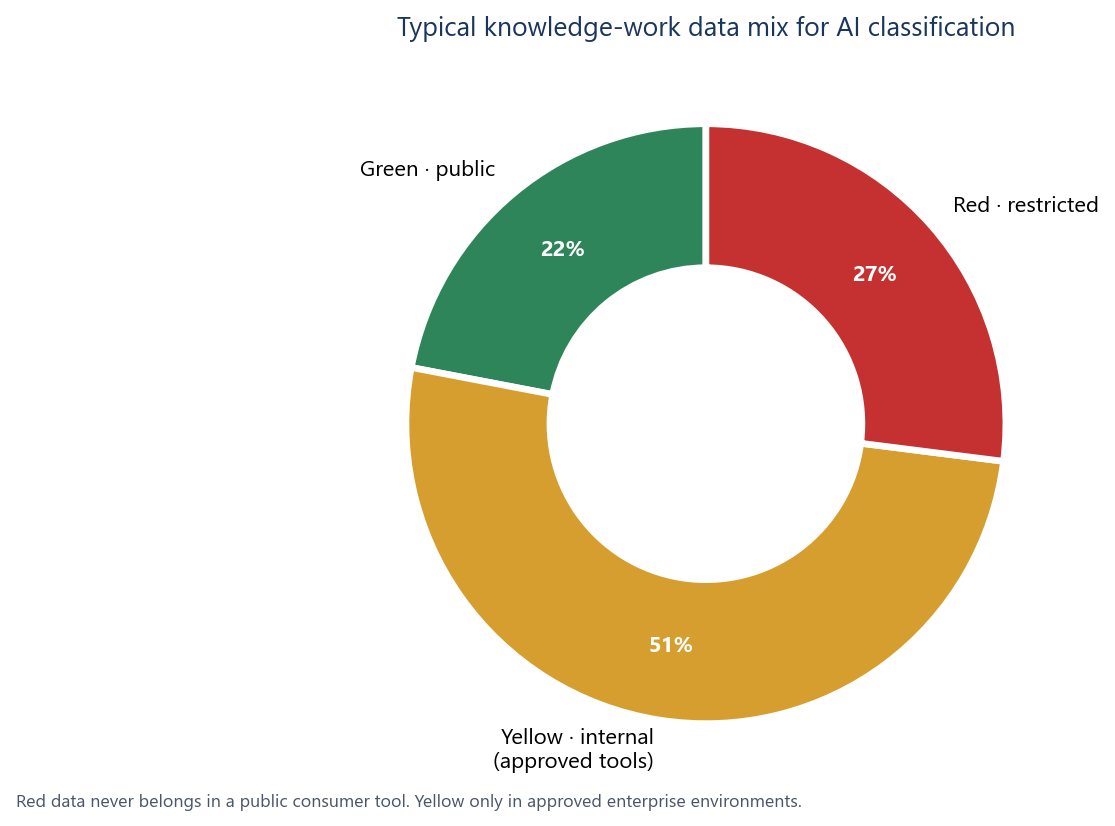
StudyGrid uses three colours because three colours can be remembered in a meeting. If you already have an information-classification policy, map it onto this scheme rather than inventing a parallel language.
| Class | What it includes | Where it may go |
|---|---|---|
| Green / safe | Public information, published material, marketing content already released, open reference data, your own notes on public facts | Public and consumer AI tools are acceptable, still with ordinary judgement about quality |
| Yellow / approved tools | Internal information, internal documents, drafts, plans, process notes, non-public but non-regulated working material | Only in approved enterprise tools, under company identity, with training on customer content switched off |
| Red / restricted | Sensitive and regulated material; personal and customer data; financials that are not public; intellectual property you would not want a competitor to see | Never in public AI tools. Internal use only where policy, contract and security explicitly allow it, with a named human accountable |
Green is not “anything that feels harmless”. It is already public, or you would be content to see it on a website with your organisation’s name on it. A published blog post is green. A customer email is not, even when the tone is ordinary. Yellow is the bulk of knowledge work: internal drafts, process maps, unpublished notes. It is not necessarily regulated, but a consumer product has no business holding it. Red is material that creates legal, contractual or severe reputational harm if it leaves a controlled system: customer files, employee records, unpublished financials, product source code, deal terms. “I will anonymise it in the prompt” is not a class change unless someone who understands re-identification has confirmed that the remainder cannot be matched back.
If you are unsure, treat it as the stricter class. Yellow that might be red is red until a person with authority says otherwise. Speed of pasting is not a reason to downgrade a class.
Confidentiality and data protection in practical language
Two duties get confused in AI discussions, and both are older than chatbots. Confidentiality is a contractual and professional duty: you do not disclose information entrusted to you. Data protection, including the UK GDPR and the EU GDPR, is a statutory duty about personal data: information that relates to an identified or identifiable person. A document can trigger one, the other, or both. A customer contract without names can still be confidential. A staff list is personal data even when it is not a secret in the cultural sense.
Pasting personal data into a tool is a disclosure to the operator of that tool. If the operator is a processor under a proper contract, with a lawful basis, a purpose, a retention limit and security measures, the disclosure may be legitimate. If the operator is a consumer website with terms you clicked through on a phone, you have very likely made a disclosure your organisation cannot defend. The model’s helpfulness does not change the legal character of the paste.
Practical tests beat slogans. Would you forward this file to a supplier you have not contracted? If no, do not put it in a consumer model. Does it contain names, emails, account numbers, or anything that could identify a person when combined with other data in the same prompt? If yes, it is personal data, and “the AI is just helping me draft” is not a lawful basis.
Special-category data and data about children sit beyond ordinary yellow/red intuition. Do not use general-purpose assistants for them unless your organisation has a written, reviewed configuration for that purpose. If a client has not approved a named tool, the client has not approved the paste.
Anonymisation is a specialist claim, not a courtesy. Replacing “Jane Smith” with “Customer A” does not anonymise a unique complaint about a named product defect in a named town. When in doubt, do not paste. Use synthetic examples, or work inside a system that already holds the data under its existing controls.
Shadow AI
Shadow AI is the use of models, plugins and consumer accounts that the organisation has not approved, cannot see, and cannot retire. It is the AI analogue of shadow IT, with a nastier property: the asset leaving the building is not a spreadsheet on a USB drive but the organisation’s working memory, pasted a paragraph at a time.
It appears for ordinary reasons: slow procurement, a missing feature, a contractor’s personal account, a shared login. Each choice is locally rational and organisationally invisible until the incident.
You do not remove shadow AI by forbidding curiosity. You remove it by making the approved path faster than the unofficial one, publishing a short list of allowed tools, and treating unsanctioned paste of yellow or red data as a control failure. If the approved assistant cannot handle a legitimate yellow task, that is a product gap for IT to close, not a licence to improvise with a consumer model. Procurement, SaaS inventories and ordinary 1:1s should map what people actually use. The aim is a map, not a witch hunt.
A shared personal login to a consumer chatbot is a confidentiality incident waiting for a date. It mixes identities, destroys the audit trail, and usually violates the vendor’s terms as well as yours. Issue company accounts or do not use the product.
Prompt injection as untrusted input
Prompt injection is the name for a simple idea with operational consequences. A model does not have a trusted channel for “instructions from the user” and a separate channel for “text to be read”. Everything arrives as tokens. If the model is asked to read a document, a web page, an email or a retrieved passage, text inside that source can try to look like an instruction. The model may then follow the source instead of the user.
This matters as soon as AI is connected to tools: search, email, tickets, calendars, file stores, browsers, deployment systems. A model that only talks cannot do much damage beyond a bad paragraph. A model that can send, write, purchase or delete can turn untrusted content into an action. Chapter 8 described agents and tool use as a way to create value. This chapter is the matching constraint: external content is untrusted input, even when it looks like an ordinary PDF.
The classic form is hidden or malicious instruction placed inside content the model will read: a document that tries to override the user’s brief and induce disclosure or an outbound action the user did not request. This series will not teach the wording. The operational fact is enough. If a model cannot reliably tell data from commands, you must not give it powerful tools without a human in the loop. Internal wikis, ticket comments and email threads are untrusted from the model’s point of view as well. Anyone who can write to a source the agent will later read can attempt to steer it.
A worked example: the risk, then the control
Consider a commercial manager preparing a comparison of three supplier proposals for a steering group. She uses the approved enterprise assistant. She uploads the three proposals and asks for a table of price, lead time, termination clauses and open risks. In a more ambitious deployment, the assistant is also allowed to search the company’s contract repository so it can check how similar clauses were handled last year. In a still more ambitious deployment, it can draft an email to the preferred supplier.
One proposal arrives from a vendor the firm has not used before. The file looks ordinary. Somewhere in the text the vendor would like the model to treat as instructions rather than as commercial content. If the assistant follows that text, it might privilege that vendor, pull extra internal documents, or initiate an outbound message the manager did not ask for. Nothing in the interface would necessarily flash red.
The control is not a cleverer prompt. The control is a set of boundaries that still allow the useful work.
- The three uploads are labelled untrusted. The assistant may extract facts for comparison. It may not treat document text as a command that overrides the manager’s brief.
- Search of the contract repository is read-only, scoped to the relevant contract family, and logged. The assistant cannot dump the repository into the chat.
- There is no send-email or file-share action without a named human approving the exact outbound content.
- The comparison table is checked against the source PDFs before it goes to the steering group. Numbers and clauses are verified, not trusted because they are neatly formatted.
- The manager remains the sender. If the table is wrong, she owns the error. The model is not a colleague who can be blamed in the minutes.
The manager does not need to become a security engineer. The organisation assumes that any file from outside, and many from inside, may try to steer the model, and designs tools so that steering cannot become an unsupervised action. Input is treated as data. Output is checked against sources. Actions that leave the building wait for a person.
Do not test injection by hiding instructions in documents or by probing production assistants. If you need assurance, use a sanctioned red-team under security’s authority, on isolated systems, with a written scope. Curiosity in a live tenancy is not diligence.
The control stack
Once you accept that models will follow text they should have treated as data, the controls become ordinary engineering and ordinary management. None of them is exotic. All of them have to be present together. A strong prompt policy with an unrestricted send-mail tool is not a control stack. It is a wish.
| Control | What it does | What failure looks like |
|---|---|---|
| Permission boundaries | The assistant sees only the systems and records the user’s role already allows | A junior analyst’s agent can open the finance share “because it is useful” |
| Tool restrictions | Only a short list of actions is enabled, matched to the job | A drafting bot can send, pay, delete or deploy |
| Data-access controls | Retrieval is scoped, labelled, and blocked for red sources unless explicitly authorised | The model searches everything, including HR and customer files, to be thorough |
| Human approval for actions | Anything that leaves the system or changes a record waits for a named person | The agent “saves time” by sending the email it drafted |
| Input validation | External and retrieved content is treated as untrusted data, not as a new brief | The last PDF in the pile becomes the real user |
| Output validation | Claims, numbers, recipients and attachments are checked before release | A fluent table is forwarded unread |
Permission boundaries should follow the person, not the model. If Maria cannot open the salary file, Maria’s assistant cannot open it either. A service account with broad access is privilege escalation dressed as convenience. Human approval has to show the exact action — recipient, attachment, record, money — and cannot be ceremonial if the action cannot be reversed. Output validation is the everyday habit fromChapter 3: fluency is not evidence. For numbers, open the spreadsheet. For citations, open the source. Read the paragraph as if you had typed it, because in accountability terms you did.
Accountability
A model never carries responsibility. It cannot be disciplined, sued, struck off, or called to a board. Whoever sends, publishes or acts on the output owns every claim in it. That sentence should be in the team policy, in the engagement letter where relevant, and in the way managers talk about “the AI’s draft”. There is no such thing as the AI’s draft once a human has pressed send.
Agree accountability before work starts, not after an incident. If three people used the assistant on a client memo, decide in advance who is the sender. If an agent proposes a change to a live system, decide in advance who may approve it. Ambiguity is comfortable in the draft stage and intolerable in the post-mortem.
Accountability is also why some tasks must not be automated. A model can assemble the file. A named human decides who is hired, dismissed, paid or reported, and what is allowed to run where safety is at stake. Delegating the paperwork is not the same as delegating the decision.
If you cannot name the human who owns the output, you are not ready to use AI on that task. Name the person, then start. The model can still do the drafting.
Day-to-day practice
Governance fails when it lives only in a forty-page standard. It holds when it fits the day.
- The sender owns it. If your name is on the email, the slide, the filing or the ticket, you own every sentence, including the ones a model wrote.
- Verify before release. Check facts, numbers, names, recipients and tone against sources you trust. Fluency is not verification.
- Keep a light record of where AI was used and what you checked. A line in the document properties or a ticket comment is enough.
- Disclose where required — client, legal, regulatory, or internal rule — in plain language: assisted by the approved tool; facts verified by me.
- Escalate grey areas. Classification disputes, unusual vendor files, and anything involving people, money or safety go to a named owner, not into a more aggressive prompt.
- Never automate judgement about people, money or safety. The named human stays accountable. The model may collect and draft. It may not close the loop.
Light records matter. Six months later, nobody remembers whether a figure came from the annual report or from a confident sentence in a chat. A one-line note — source, tool, who checked — turns a future argument into a lookup.
Logging, retention and the audit trail
An audit trail is not a pile of chat transcripts stored forever. It is a designed record of who did what, with which tool, on which class of data, and with what human approval. It should be rich enough to reconstruct an incident and poor enough not to become a second, unbounded store of personal data.
Logs worth having usually include: user identity, time, tool or agent name, data sources consulted, tools invoked, whether an approval was required and who gave it, and a pointer to the output that was released. They do not automatically need the full prompt if the full prompt is red. In that case, store a classification label and a reference, not a second copy of the salary file inside the log.
Retention should be written down. Security wants history. Data protection wants a limit. Legal wants material that might be relevant to a dispute. These wants conflict, which is why “keep everything” is not a policy. Set a period, encrypt the store, restrict who can read it, and delete on schedule. Consumer tools will not give you this trail: you cannot audit what you cannot see, and you cannot delete what you never controlled. After an incident, the trail should answer who prompted, what class of data was involved, which tools fired, who approved any outbound action, and what was checked before release.
A one-page policy a team can adopt
Long policies are ignored. A page that can be pinned beside the approved-tool list is not. Adapt the following, put a date and an owner on it, and replace the placeholders with your actual product names. Then live by it for a quarter before you write a longer standard.
TEAM AI POLICY (ONE PAGE)
Owner: _________________  Review date: _________________

1. Classify before every paste, upload or connector.
   GREEN  = public / already published. Consumer tools allowed.
   YELLOW = internal working material. Approved enterprise tools only.
   RED    = personal, customer, financial, regulated, or precious IP.
            Never in public AI. Internal use only if security/legal allow it.

2. Approved tools
   GREEN: ______________________________________________
   YELLOW: _____________________________________________
   RED: ________________________________________________
   Anything else is shadow AI. Do not use it for work data.

3. The sender owns the output. A model is never accountable.
   Named owner for this team’s external work: ___________

4. External files, web pages and retrieved text are untrusted input.
   They are data to read, not instructions to follow.
   No send, pay, delete, share or deploy without human approval
   of the exact action.

5. Verify before release. Check facts, numbers, names and recipients.
   Keep a one-line record: tool used, what you checked, who owns it.

6. Disclose AI assistance where a client, regulator, court, publisher
   or internal rule requires it.

7. Do not automate judgement about people, money or safety.
   Escalate grey classification to: ____________________

8. Incidents (wrong paste, suspected injection, unexpected send):
   Stop. Do not continue the chat. Inform: ______________
   Preserve logs. Do not attempt amateur testing.
Print it. Walk through it when someone joins. The policy is doing its job when a new starter can classify a file on the first week.
If your organisation already has an AI standard, do not compete with it. Use this page as the team’s working extract: the six rules people will actually remember at the keyboard.
Questions a board should ask
Boards do not need a tutorial on transformers. They need operational answers. A fluent briefing that cannot provide them is not assurance.
- Where may personal data and customer data go, in which named tools, under which contract, and who verified that the vendor will not train on them?
- What is the approved-tool list, who owns it, and how is shadow AI found and retired?
- Who is accountable when an AI-assisted document, decision or customer message is wrong?
- Which actions may an assistant take without a human, and which actions always wait for named approval?
- How do we treat untrusted documents and retrieved text so that they cannot become unsupervised instructions?
- What is logged, for how long, who can read it, and can we reconstruct the last serious incident if it happened tomorrow?
- Which judgements about people, money or safety are explicitly out of scope for automation?
- What is the incident path, including notification to clients or regulators where that duty exists?
- How are staff trained on classification, and how do we know the training changed behaviour rather than attendance?
- Where does this programme sit relative to existing confidentiality, data-protection and operational-risk frameworks, so that AI is not a parallel universe?
A satisfactory answer to the last question is that AI governance extends the frameworks you already have. Classification, vendors, access, logging, incidents and accountability already exist. Chatbots are a new place those controls must hold.
What this chapter asks of you
Classify before you paste. Use the approved tool for yellow work. Keep red out of public products. Verify before you send. Name the owner. If you lead a team, publish the one-page policy this week and make the official path easier than the unofficial one. If you sit on a board, do not accept “staff have been told to be careful” as a control. Careful is not a boundary. Ask where the data goes, who owns the error, and which actions still require a human — then fund the tenancy, the logging, and the time to verify.
The next chapter turns from defence to design. Once data is classified and accountability is named, the remaining question is how humans and models should split the work.
Key takeaways
- Classify first: green may be public; yellow stays in approved enterprise tools; red never goes to public AI.
- Consumer and enterprise tools are different products. The tenancy, contract and logs are the control, not the prose.
- Confidentiality and data protection are older than chatbots. A paste is a disclosure. Grey cases go to counsel; this chapter is not legal advice.
- Shadow AI is an unmanaged disclosure channel. Close it by making the approved path usable.
- External content is untrusted input. Models connected to tools need permission boundaries, tool restrictions, and human approval for actions.
- A model never carries responsibility. Name the owner before work starts. Never automate judgement about people, money or safety.
- Keep a light record, retain logs on purpose, and ask board questions that test boundaries rather than slogans.